Short answer
An epaper frame displays photos on reflective electronic paper — it looks like a framed print, runs months on a battery and never glows; a digital photo frame uses a backlit LCD — it plays video and rapid slideshows but needs a power outlet and reads as a screen. Pick e-paper when the frame should disappear into the room as art. Pick LCD when you want a live, bright window of family moments that changes every few seconds. Price is the honest trade: comparable LCD frames cost $150–$260, while 13.3" epaper frames run $399–$599.

The core difference: reflected light vs emitted light
Every practical difference between the two frame types flows from one physical fact: e-paper reflects room light, LCD emits its own. An epaper photo frame holds microscopic pigment particles in place — the image physically exists on the surface, like ink on paper, and draws no power to stay there (the technology is explained fully in our e-ink picture frames guide). An LCD frame recreates its image sixty times a second with a backlight shining through liquid crystals — brilliant, animated, and permanently powered.
Why does that one fact matter so much?
Because it decides where the frame can live, how it ages into a room, and what content suits it. Reflection means no glare fight in daylight, no glow at night, no cord — and no video. Emission means vivid motion at any hour — and a device that always announces itself as a screen.
Side-by-side: epaper frame vs digital photo frame
| Decision point | E-paper frame | LCD digital photo frame |
|---|---|---|
| Looks like | A framed print | A tablet on the wall |
| Light behavior | Reflects the room; better in daylight | Emits light; fights glare, glows at night |
| Power | Battery, months per charge | Wall outlet, always on |
| Placement | Any wall, no outlet needed | Within cord's reach of an outlet |
| Video / motion | No | Yes |
| Image change speed | ~12 s full refresh, a few changes/day | Instant, every few seconds if wanted |
| Resolution (13" class) | 1600×1200 typical | 1920×1200 (Aura Carver) to 1280×800 |
| Typical price | $399–$599 (13.3") | $150–$260 (10–15") |
| Annual electricity | ≈0.1 kWh | ≈40–53 kWh |
Sources: Aura Help Center (power draw); oneSmartcrib 2026 LCD frame comparison; einksmart testing, July 2026.
Power and placement: the cord decides more than you think
The outlet requirement quietly dictates where an LCD frame can hang; battery power lets an epaper frame hang like art. Interior designers put framed prints at eye level on feature walls, stair landings, above mantels — places outlets rarely exist. A dangling cord ruins exactly the placement that makes wall art work. This is the epaper frame's structural advantage: it obeys picture-hanging rules, not electronics rules.
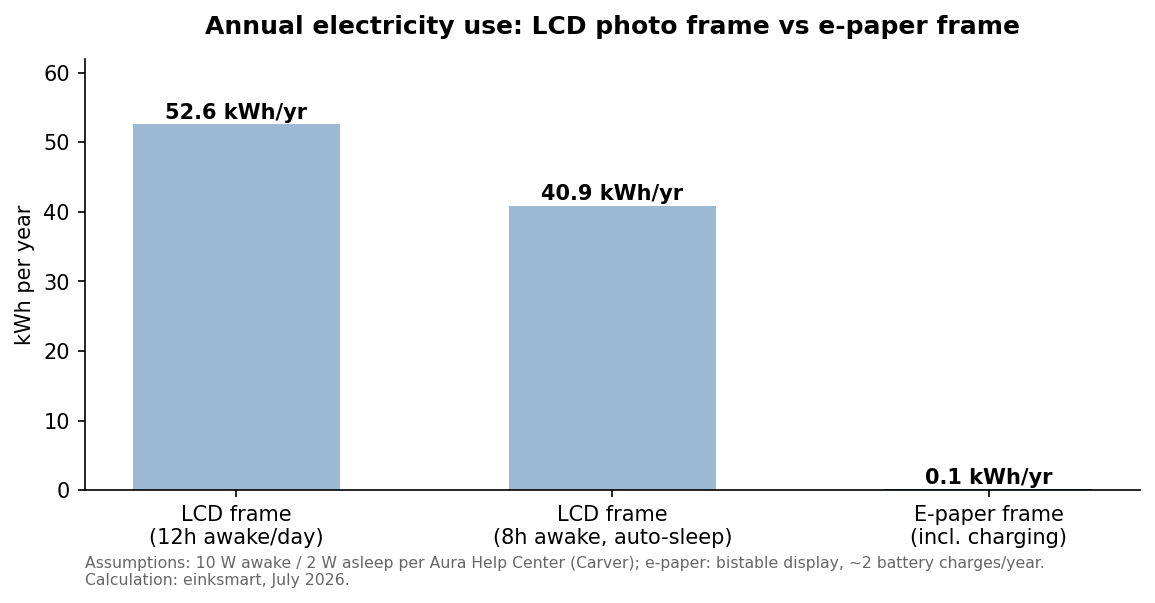
On electricity itself, honesty helps: 40–53 kWh a year costs most households under $10. The energy argument is not about your bill — it is about what zero-power stillness enables: no cord, no heat, no standby light, and a frame that keeps its image during a power cut.
What about battery anxiety?
It is milder than phone-charging habits suggest. A typical epaper frame charges over USB-C two to four times a year — closer to watering a houseplant than managing a device. LCD frames trade that chore for a permanent cord; auto on/off scheduling (Aura and Nixplay both offer it) at least stops the glow at night.
Which actually looks better on a wall?
In daylight, e-paper; in a dim room showing motion, LCD; and for skin tones under lamplight, it is closer than spec sheets admit. LCD wins raw color: 16 million saturated colors versus roughly 60,000 print-like ones on E Ink Spectra 6. But wall art is judged in room light. A backlit panel surrounded by matte frames looks like a TV left on; a reflective panel matches the paper, canvas and wood around it. Our 2026 color e-ink frame buyer's guide covers how the leading epaper brands render photos differently.

The honest weaknesses, both directions
E-paper: no video, seconds-long refreshes, softer saturation, higher price. LCD: glare, glow, cord, and the unmistakable look of a screen. Any comparison that hides either list is selling you something.
Room by room: seven placements, decided
Abstract comparisons stall; walls decide. Here is how the choice plays out in the seven placements customers ask us about most:
| Placement | Better fit | Why |
|---|---|---|
| Living room feature wall | E-paper | Print aesthetic among other art; no outlet at eye level; no glow during movie nights. |
| Kitchen counter | LCD | Power is nearby, ambient light is bright, and a rotating family stream suits a utility room. |
| Bedroom | E-paper | Any light source in a bedroom is a cost; e-paper is dark the moment the lamp goes off. |
| Home office shelf | Either | LCD for video-call background energy; e-paper for focus and calm. Outlet access usually exists. |
| Hallway / stair landing | E-paper | Almost never has an outlet; classic gallery-wall territory. |
| Nursery | E-paper | Zero light, zero heat, zero cord within reach of small hands. |
| Grandparents' sideboard | LCD | Plug in once, photos arrive forever; the strongest LCD use case there is. |
Source: einksmart customer interviews and placement requests, 2025–2026.
Five years on the wall: how each type ages
E-paper ages like hardware you forget; LCD ages like electronics you notice. Three aging factors differ meaningfully:
- Panel wear. LCD backlights dim gradually with thousands of always-on hours, and static interface elements can ghost on cheaper panels. E-paper has no backlight to dim; its refresh cycles are consumed only when images change — at five changes a day, decades of headroom.
- Battery health. The e-paper frame's lithium cell is the component that ages, but at two to four charge cycles a year it degrades slower than almost any battery product you own. LCD frames dodge the question with the cord they are chained to.
- Software support. Both types depend on a company keeping its app and cloud alive. Ask any vendor — including us — what happens to the frame if the service closes. (Our answer: MagiRealm frames keep local scheduling and USB image loading without the cloud.)
Does e-paper suffer screen burn-in?
No — but it has a cousin: ghosting. A faint residue of the previous image can persist after a refresh on lower-quality waveform tuning. Modern panels clear it with a full refresh cycle, and E Ink's Ripple waveform reduces the visible flashing that older frames showed during updates. If you demo a frame, change images twice and look for residue — a ten-second test that reveals rendering quality.
Content and apps: what will you actually display?
Match the frame to the content, not the other way round. A grandparent frame receiving thirty photos a week from three children's families is an LCD use case — instant changes, video clips, zero friction (Aura's app leads here, as we noted in our buyer's guide). A curated wall that shows a Rothko in the morning and family black-and-whites at dinner is an epaper use case — scheduled, deliberate, framed. At einksmart we build the second kind: our MagiRealm frames pair real-wood framing with a curated art platform, because we believe walls deserve editors, not feeds.
Why did LCD frames get a bad reputation — and does it still apply?
The 2008-era gift-shop frame earned it; the 2026 flagship mostly does not. First-generation digital photo frames were low-resolution, glossy, SD-card-fed and abandoned in drawers by February. Modern LCD frames from Aura, Nixplay and Skylight fixed the pipeline: cloud sharing, family invites, auto brightness, scheduling. What they cannot fix is physics — a backlit rectangle reads as a screen in a way no software can soften. That is the honest boundary line of this whole comparison: software matured on both sides; the light source still decides the aesthetics.
Can one household want both?
Commonly, yes: an LCD frame on the kitchen counter for the photo stream, an epaper frame in the living room for art. They are different furniture. The kitchen frame is an appliance; the living-room frame is décor.
Which is the better gift?
For a recipient who will maintain nothing: LCD. For a recipient whose home you admire: e-paper. Gifting is where the two philosophies separate cleanly. The LCD frame is a service you set up for someone — load the app, invite the family, plug it in, done; it is the best-selling grandparent gift in consumer tech for a reason. The e-paper frame is an object you give someone — closer to gifting a framed print that happens to change. Price brackets reinforce it: $150–$260 is safe gift territory, $400+ signals a statement. If the gift is for a design-minded household, the epaper photo frame is the rarer, more memorable object; nobody has ever unwrapped one before.
Real cost of ownership over five years
| Cost line | E-paper frame (13.3") | LCD frame (10–15") |
|---|---|---|
| Hardware | $399–$599 | $150–$260 |
| Electricity (5 yrs) | ≈ $0.10 | ≈ $35–$45 |
| Subscription | Varies; check free tier | Varies (Nixplay/Skylight tiers; Aura free) |
| Installation | Picture hook | Outlet proximity or cable channel |
| Typical 5-yr total | ≈ $400–$600 | ≈ $185–$400+ |
Sources: brand pricing July 2026 (auraframes.com, nixplay.com, skylightframe.com, inkposter.com); electricity at ~$0.17/kWh US average. Subscription costs vary by plan.
LCD stays cheaper over five years; what you buy with the epaper premium is placement freedom and the print aesthetic. Whether that is worth $250 extra is a design decision, not a technical one — which is exactly why we encourage buyers to see both in a real room before deciding, and say so on our contact page.
The 30-second decision guide
- Choose an epaper frame if: the frame hangs in a living space you have styled; there is no outlet where it should go; screens at night bother you; your content is art, illustration or curated photos changing a few times a day.
- Choose an LCD digital photo frame if: you want video clips and constant new photos; it will sit on a counter or shelf near power; the recipient values ease over aesthetics; budget caps at ~$260.
- Still torn? Decide by room. Kitchen and home office: LCD. Living room, bedroom, hallway, anywhere guests linger: e-paper. And if the wall in question is in a hotel, gallery or office, see our commercial E-Ink vs LCD signage comparison — the logic scales.
What about just using an old tablet?
A tablet is the worst of both worlds on a wall: LCD glow and cords without frame aesthetics, plus an OS that fights kiosk duty. It works as a desk experiment, but tablets sleep, update, notify and dim on their own schedule; photo-frame software on tablets needs constant supervision. Dedicated frames exist because both categories solved the "it just works for years" problem — LCD frames with mature cloud apps (see Nixplay's spec approach), e-paper frames with bistable stillness. If the tablet is free and the wall is in a workshop, fine; anywhere guests sit, buy the purpose-built object.
And digital art subscriptions — do they lock me in?
Check three things before committing to any brand: what works offline, what works unsubscribed, and how your own images get in. The industry is young enough that policies differ sharply. Some LCD brands tier cloud features; some e-paper brands paywall art libraries while keeping personal uploads free. Our position at einksmart: personal photos and local scheduling should never sit behind a paywall — the subscription should sell curation, not captivity. Whatever brand you choose, get the answer in writing before the frame is on the wall.
FAQ
Is an epaper frame better than a digital photo frame?
Neither is universally better. E-paper looks like a print, hangs anywhere and never glows; LCD plays video and costs less. Choose by what the wall is for.
Do epaper frames glow at night?
No — they darken with the room like a print. Some add a gentle optional front light; there is no backlight.
Why are epaper frames more expensive?
Color ePaper panels cost more to make than LCDs and ship in lower volume: $399–$599 for 13.3" e-paper versus $150–$260 for comparable LCD frames.
Can an epaper photo frame show video?
No. Refreshes take ~12 seconds; e-paper suits a few image changes per day. For video, use LCD.
How much electricity does each use?
LCD: about 10 W awake / 2 W asleep — roughly 40–53 kWh/year. E-paper: about 0.1 kWh/year including charging.
Can one frame do photos and art?
Yes, both types mix them. E-paper renders with print-like softness; LCD favors saturated photos and motion.